
Cold Room Door Open Alarms: Design, Delays and Troubleshooting
A practical guide to cold-room door open alarms: contact selection, alarm delays, temperature protection, testing, and common faults for refrigeration operators and OEMs.
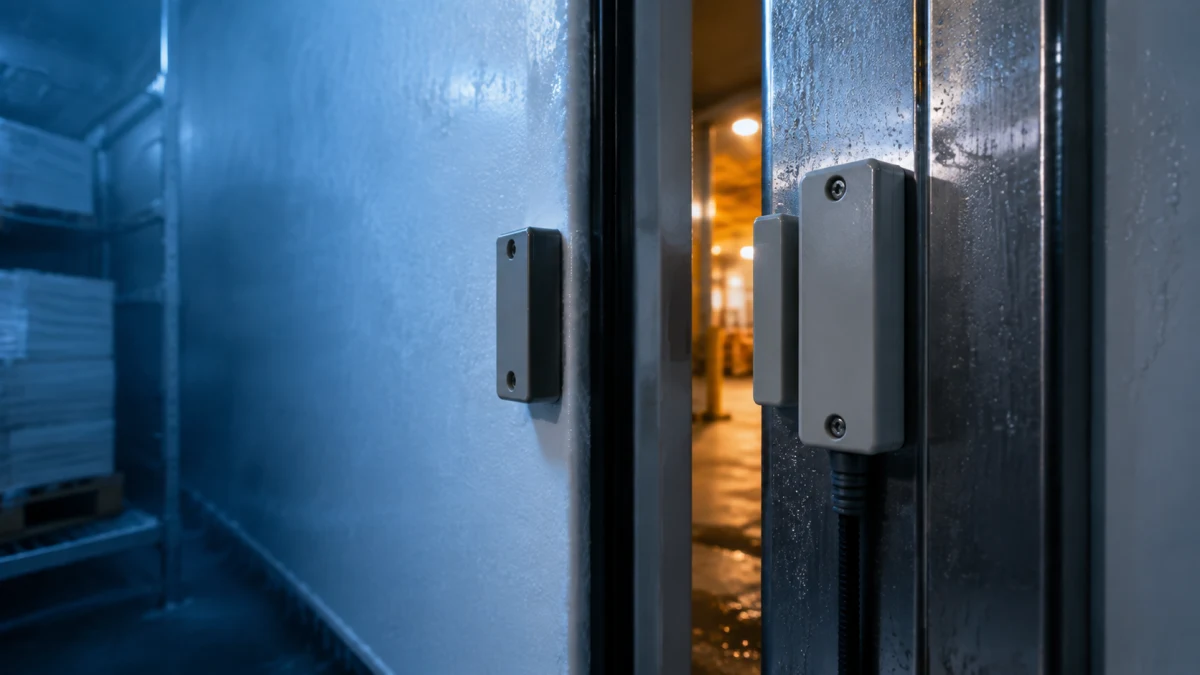
An open cold-room door is not a small event. It brings warm, moist air into the room, adds refrigeration load, and can turn a routine loading delay into frost, temperature instability, or a product-risk investigation. A door-open alarm gives operators a chance to act before the room temperature tells the whole story.
This guide explains what a practical cold-room door alarm needs, how to avoid nuisance alarms, and how to troubleshoot a system that does not behave as expected. For the wider monitoring picture, read our remote cold-room monitoring guide and food-safety temperature logging guide.
What a door-open alarm should detect
The basic signal is simple: a contact changes state when the door leaves its closed position. In an industrial cold room, however, the alarm logic must handle the real operating environment—heavy insulated doors, forklift traffic, condensation, wash-down, strip curtains, and loading periods.
A useful system defines three things clearly:
- the door state: closed, open, or faulted;
- the allowed open time before an alarm becomes actionable;
- the notification path: local buzzer or light, controller alarm history, remote alert, or an agreed combination.
The door signal is an early warning, not a replacement for temperature alarms. A door can be open briefly without an excursion; a poorly sealed closed door can still cause one. Use both signals together.
Select and install the contact for the actual door
Magnetic contacts, mechanical limit switches, and position sensors can all indicate door state. The right choice depends on door travel, mounting space, cleaning practice, cable protection, and the control system input. Select equipment appropriate to the site and follow its installation instructions.
Mount the sensor so that normal closing produces a repeatable, positive state. It should not depend on a loose door panel, a flexible gasket, or a position that pallets and personnel can strike. Protect the cable where it crosses moving or exposed areas, and label the circuit at the panel.
Before commissioning, physically open and close the door several times while observing the controller input. Test it with the door closed, slightly unlatched, and fully open. A contact that only changes state after a large opening may miss the condition that matters most.
Set a delay that matches the workflow
An alarm that triggers during every normal delivery will be ignored. An alarm that waits too long misses its purpose. The right delay comes from observing actual use: pedestrian access, picking, pallet transfer, cleaning, and emergency egress all have different door-open durations.
Start with a documented operational expectation, then validate it with users. Consider a staged approach:
- show a local reminder after a short delay;
- raise a logged alarm if the door remains open;
- escalate to the responsible person only when the event persists or repeats.
Avoid copying a delay from another room. Door size, humidity, product sensitivity, traffic pattern, and refrigeration capacity all change the risk. Review the delay after seasonal changes or altered loading practice.
Link door events to refrigeration and temperature data
Door events become far more useful when they are recorded alongside room temperature, alarm state, defrost status, and compressor command. This context can answer practical questions: Was the room already warming? Did the door remain open through a defrost cycle? Is the same shift seeing repeated events?
If a temperature alarm follows a door-open event, do not assume the door is the only cause. Check door seals, closing hardware, airflow, loading practice, and refrigeration performance. Compressor-current trends can provide an additional diagnostic signal; see our compressor current monitoring guide.
Common door-alarm faults
Many apparent alarm faults start with installation details:
- Alarm stays open when the door is shut: check contact alignment, magnet gap, mounting movement, wiring, and controller input logic.
- Alarm never changes state: check supply or input configuration where applicable, damaged cable, incorrect contact type, and whether the contact is actually being actuated.
- Repeated nuisance alarms: review delay settings, door workflow, contact bounce, vibration, and whether the door is being left on a latch rather than fully closed.
- Temperature rises without a door alarm: inspect the seal, door heater where fitted, closing mechanism, traffic pattern, and refrigeration system; the contact may be working while the door is leaking or the problem lies elsewhere.
Do not bypass a recurring alarm without recording the reason and correcting the cause. A muted signal can hide a developing refrigeration or operating problem.
Commissioning checklist
Before relying on a door-open alarm, verify:
- The contact state is correct when the door is fully closed, unlatched, and open.
- The wiring and labels match the electrical diagram.
- The delay fits the approved operating workflow.
- Local and remote notifications reach the intended people.
- Door events appear in the alarm or monitoring record with useful timestamps.
- Temperature and door alarms are tested without defeating required safety systems.
- Operators know when to close the door, inspect it, or call maintenance.
Build the controller specification around the door plan
For a standard refrigeration controller, confirm the available digital inputs and alarm configuration in the applicable product documentation. The BF-6800 series and BF-6812LC can be evaluated against your actual input, display, and refrigeration-control requirements.
For an OEM project, Beamform can discuss hardware inputs, firmware logic, alarm behavior, display wording, communication protocols, and branded interfaces around an agreed door-monitoring workflow. Contact Beamform with the electrical diagram, door type, operating sequence, alarm route, and target application.
Frequently asked questions
Should a door-open alarm replace a temperature alarm?
No. Door state warns of a likely cause early; temperature monitoring confirms the storage condition. Use them together.
How long should a cold-room door alarm delay be?
There is no universal setting. Base it on observed door use, product sensitivity, room load, and the approved workflow, then validate it with operators.
Why does a closed cold-room door still cause a temperature problem?
The seal, alignment, closing hardware, insulation, traffic pattern, or refrigeration system may be at fault. A door contact only confirms position, not airtightness or cooling performance.